Five options on your artwork
Put up to five fonts over your actual design. Set size, colour, tracking, stroke and shadow once for all of them, or tune each one.
In Photoshop, one click puts your open document behind them.

 Photoshop 2025+WindowsMac
Type a headline once and see it in all your installed fonts, in seconds. Click one and your text layer in Photoshop changes with it.
On your phone? We’ll email your trial key and the download link. Open it on your Windows PC or Mac.
What the film shows (text version). 26 seconds, with sound.
See your headline in all of them, try the shortlist on your artwork, and let the client pick by number.
Put up to five fonts over your actual design. Set size, colour, tracking, stroke and shadow once for all of them, or tune each one.
In Photoshop, one click puts your open document behind them.

Export the options as one image, numbered 1 to 5. Send it for approval. The client replies with a number.
Making a layout with an AI tool? Hand it the exact fonts you picked. How Send to AI works
Every font you own, organised around the job: shown on your words, sorted by style, kept by client.
All your installed fonts and activated Adobe Fonts show your text and their name. Each weight and italic is drawn in its own face.
Find a font by name, or narrow the list to serif, sans serif, script, display or monospace, and to a weight.
Writing in Chinese, Arabic or with accents? Fonts missing a letter drop out, so every font you see can set your text.
Star a font into Favorites or into a collection for each client or project, ready for the next job.
Font files that say trial, demo or personal use get a “Trial font” badge in the Mockup.
Switch the Fonts tab to Free and install free Google and open-source fonts in one click, in the app. No admin rights needed.
Open it from Plugins › FontHound and keep it next to your layers.
Needs Photoshop 2025 or newer, on Windows or a Mac.
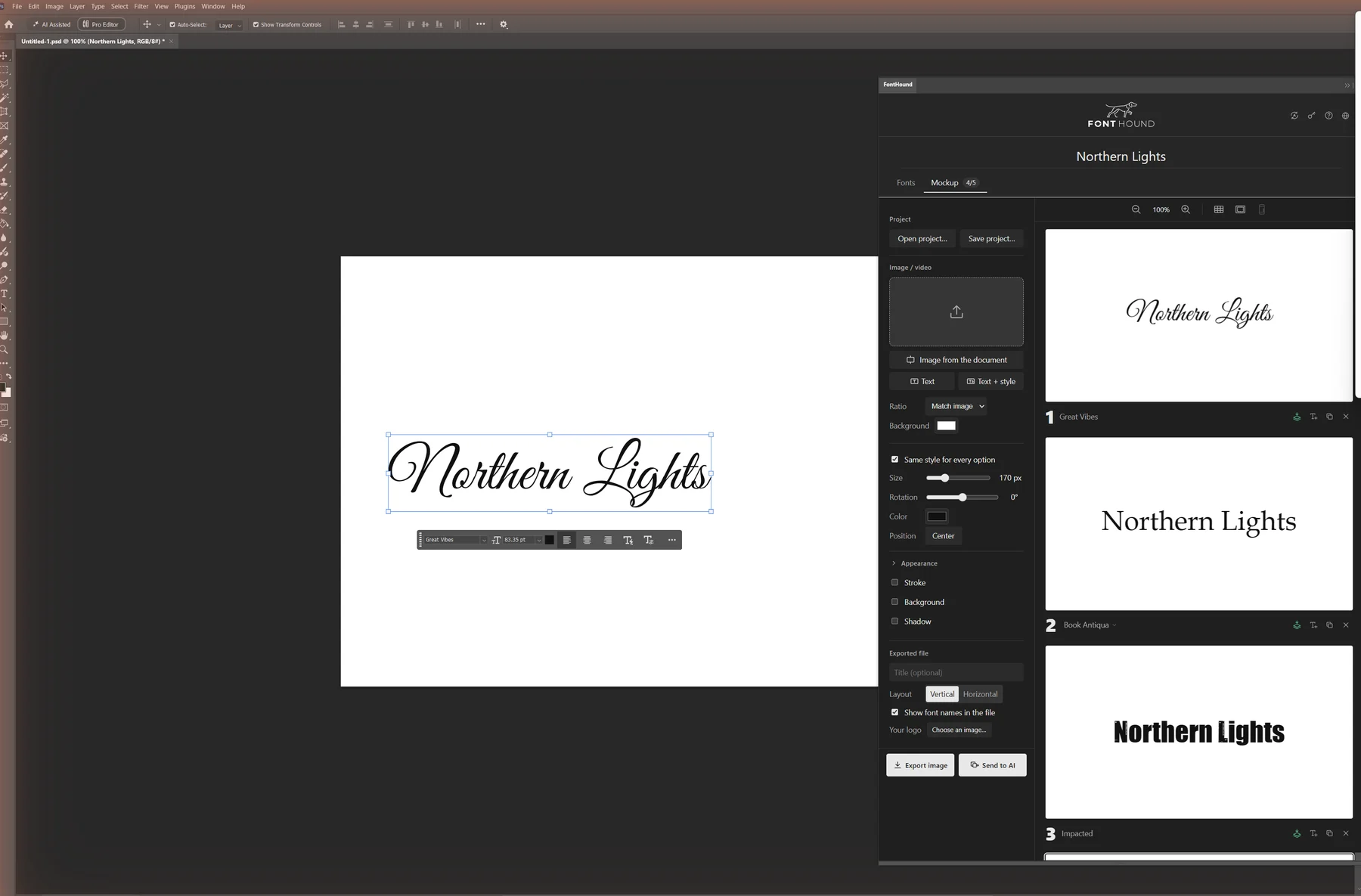
Its font menu shows you one font at a time. FontHound is for deciding.
| Photoshop’s font menu | FontHound |
|---|---|
| Previews the font you hover, one at a time | Every font at once, on your line |
| Lists fonts that can’t set your letters | Only the fonts that can |
| One look on the canvas at a time | Up to five styled options side by side |
| Client options mocked up by hand | One numbered sheet, in a click |
| A starred favourites filter | Collections per client |
Keep the font menu for the final tweak. Use FontHound to choose.
Launch price
Or $49 once: yours to keep, updates included. 7 days free, no card. One computer per license, up to five per purchase.
Already sure? $19 / year $49 once · yours to keep
$19 a year renews automatically until you cancel. Cancel anytime, full refund within 14 days.
Photoshop 2025 or newer, on Windows or a Mac. Once installed, open it from Plugins › FontHound.
Both: 64-bit Windows, or macOS 11 or later on Apple silicon and Intel Macs.
Not today. Inside Adobe’s apps, FontHound works in Photoshop. The FontHound app works next to any design tool: pick there and copy the font’s exact name.
Yes. Your activated Adobe Fonts show up next to the fonts you installed.
No. FontHound shows and organises the fonts installed on your computer, Adobe Fonts included, and the app can install free Google fonts for you. It doesn’t activate or deactivate fonts.
FontHound shows your fonts; it doesn’t license them. You’re responsible for having the right license for every font you use, including in designs for clients. The Mockup marks font files that say trial, demo or personal use, as a reminder.
$19 a year after a 7-day free trial, renewing automatically each year until you cancel. Or $49 once: yours to keep, updates included.
Same FontHound, every feature, either way. $19 a year renews until you cancel; $49 once is yours to keep, with every update included. Each license is for one computer, Windows or Mac.
$19 a year is our current price. If it changes, the new price only applies from your next renewal, and we’ll email you at least 30 days before. A one-time license is paid once and never renews.
We’ll email your trial key and the download link. Your 7 days start when you activate the key. No card needed.
On your phone? That’s fine: open the email on your Windows PC or Mac.