
Use FontHound in Photoshop
See your text in every font, try a few on your design, and put the pick on your text layers in one click.
Not installed yet? Install FontHound in Photoshop first.
1. Find fonts on your text
- Open the panel: Plugins › FontHound.
- Type your text in the box at the top. Every font now shows it.
- Narrow the list with the style and weight filters if you like. Fonts that miss a letter of your text drop out on their own.
Your text is already on a layer? Select the layer, open the Mockup tab and click Text.
2. Apply a font in one click
- Select one or more text layers in the Layers panel.
- In FontHound's Fonts tab, click the green apply button on a font. Or open the family and click one style.
The font changes on the selected layers, in one history step.
3. Try a few on your design
- Click + on up to five fonts. They go to the Mockup.
- Open the Mockup tab.
- Click Image from the document. Your design appears behind every option.
- Set the size, colour and position. Every option follows.
- Open Appearance for tracking, leading, stroke, background and shadow.
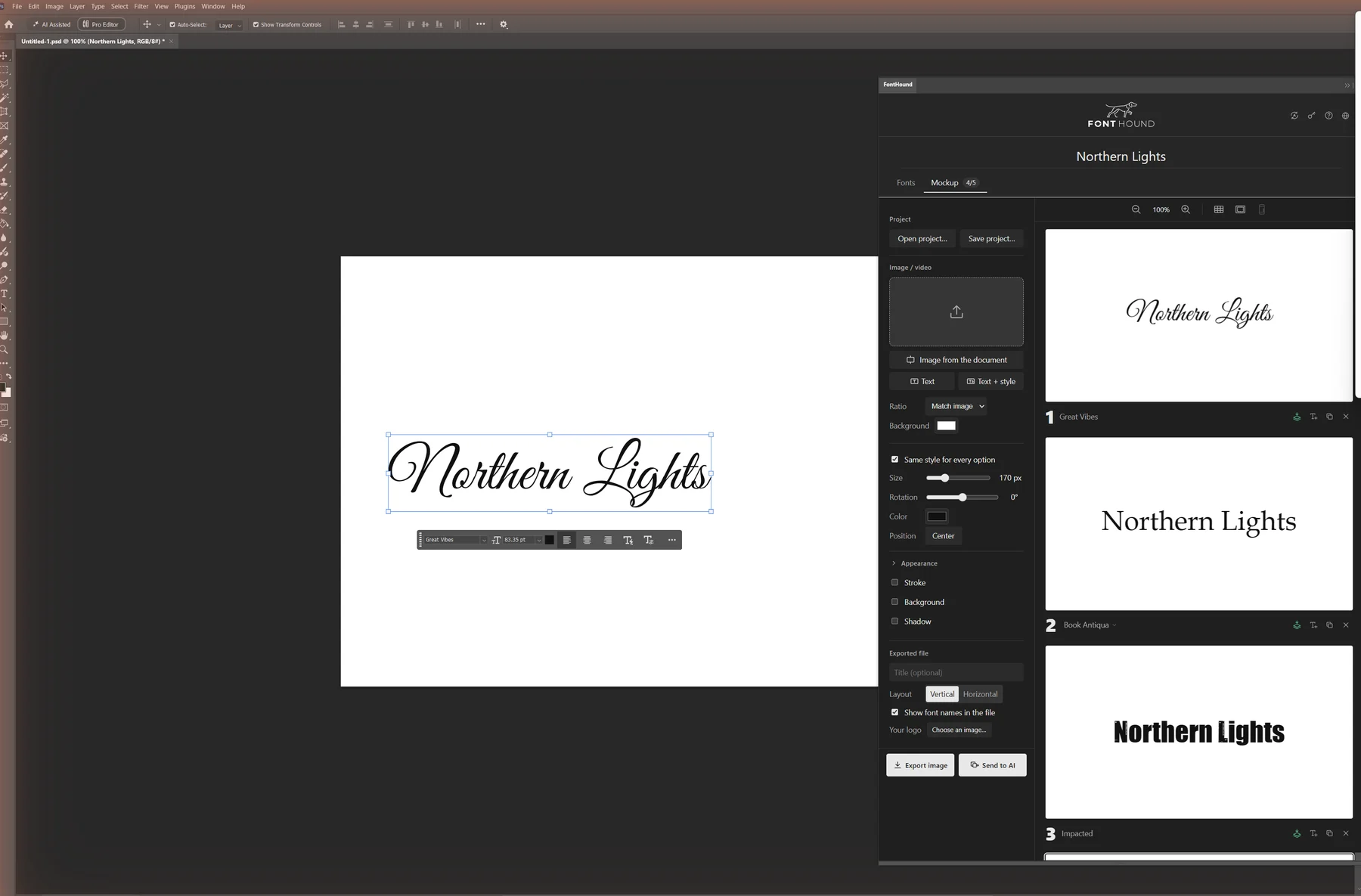
4. Apply the whole look
- Select your text layers.
- Click the green apply button under the option you want.
Your layers take the option's font, size, colour, tracking and leading. Stroke and shadow arrive as layer styles. The background box stays in FontHound, because it can't follow the text in Photoshop. It's one history step.
The T+ button on an option adds a new text layer with that look instead.
If it doesn't work
- "Finish editing the text in Photoshop first". You're still typing with the Type tool. Press the check mark in the options bar (or Esc), then click FontHound again.
- "No text layer selected in Photoshop". Select the text layers in the Layers panel first.
- No Free or All switch in the panel. Photoshop panels can't install fonts. Install free fonts in the FontHound app (Fonts tab, Free), then restart Photoshop.
- The panel says "Open the FontHound app once on this computer". Open FontHound from the Start menu (on a Mac, from Launchpad), then open the panel again.